Best eBay Competitor Research Tools 2026: 7 Tools Compared
Finding proven products is the single highest-ROI activity on eBay. The fastest way to find them is to look at what successful sellers are already selling. Here is an honest comparison of the 7 best eBay competitor research tools in 2026 — what they cost, what they actually do, and which one fits your stage.
Why Competitor Research Beats Every Other Research Method
There are three ways to find products to sell on eBay. You can guess based on what you think will sell. You can follow Amazon or AliExpress trending lists, which every other dropshipper is also following. Or you can study sellers who are already making money on eBay and sell what they sell.
The third approach is the only one that consistently works. If a seller has 4,000 listings and is doing 200 sales per month, you already know the products convert on eBay. You already know the prices buyers will pay. You already know the niches are not VERO-trapped. You just have to copy the winners and list them yourself.
This is why competitor research tools exist. They let you paste a seller URL, extract their entire active inventory, filter by bestsellers, and list the proven products on your own account. This is how most successful dropshippers find their first 500 products.
What a Good eBay Competitor Research Tool Does
Not every tool that calls itself "research" actually does competitor research. Here is what to look for.
Seller URL input. The most important feature. You paste the eBay URL of any seller and the tool pulls their active listings. If a tool only shows trending products from Amazon or AliExpress, that is supplier research, not competitor research.
Sold data, not just active. An active listing does not mean it sells. Sold data — how many units moved in the last 30 days and at what price — tells you the truth. Tools that only scrape active listings miss this.
Category drill-down. You should be able to pick a category, see the top 100 sellers, and identify which categories have the highest sell-through rate. This is where market intelligence tools like Zik shine.
VERO filtering. When you find a winning product in competitor research, you need to know immediately if the brand is VERO-restricted. 3,390 brands are restricted in 2026. A research tool without VERO filtering will send you chasing products you cannot legally sell.
Export to list. The best tools close the loop — you research, find winners, and list them with one click. Tools that only export CSV force you to copy-paste into a separate listing tool, which wastes hours.
Price and review data. Good research tools show you the source price (on Amazon or AliExpress), the eBay selling price, the margin, and the review count. This lets you skip products that cannot be profitable.
The Top 7 eBay Competitor Research Tools (Comparison)
This table shows how the seven serious research tools stack up on the features that actually matter.
| Feature | UnicornDS | Zik | Terapeak | AutoDS Finder | EcomSniper | eBextractor |
|---|---|---|---|---|---|---|
| Seller URL scan | ✓ Unlimited | ✓ | Limited | Limited | ✓ | ✓ |
| Category drill-down | Basic | ✓ Deep | ✓ Deep | Basic | Basic | ✗ |
| Sold data | Active + sold | Active + sold | ✓ Sold only | Trending | Active | Active |
| VERO filtering | ✓ 3,390 brands | ✗ | ✗ | Basic | Basic | ✗ |
| Export to list | ✓ One-click | CSV only | CSV only | ✓ | ✓ | CSV only |
| Source price data | Amazon + Ali | eBay only | eBay only | Multi | Amazon + Ali | Active only |
| 7-day trial from £1 / trial | 7-day £1 trial | 7-day paid | Free w/ Basic eBay | No | No | No |
1. UnicornDS Competitor Scanner — Best All-in-One
Type: Chrome extension
Pricing: Included in all paid plans (£29.99+/month); 7-day trial from £1
Best for: Sellers who want to research and list in the same tool
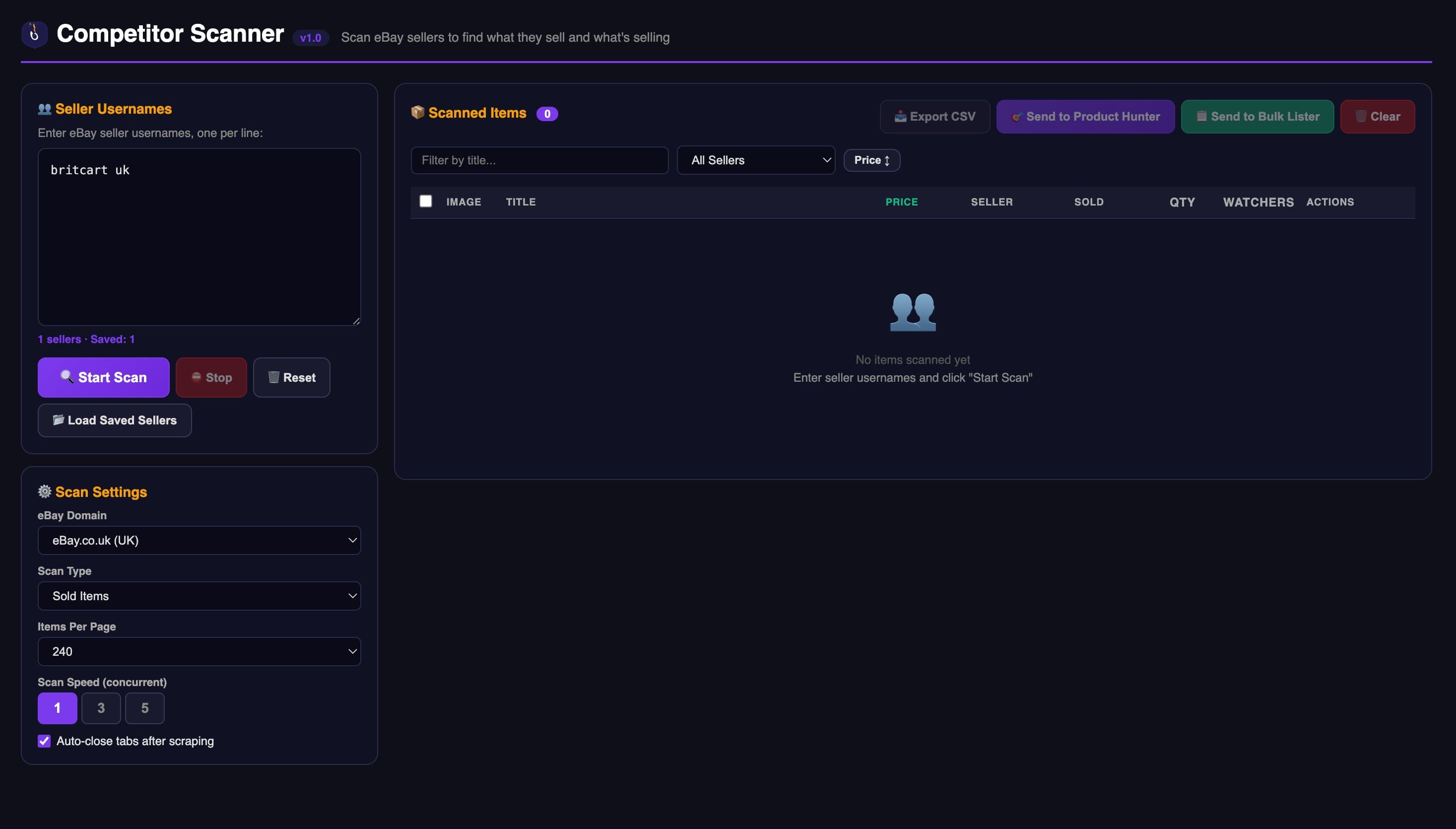
Competitor Scanner — paste an eBay seller URL, get their active listings with VERO status and source pricing.
The Competitor Scanner in UnicornDS is the core research tool for most users. You paste any eBay seller URL — yours, a competitor, a rival dropshipper — and the tool pulls their complete active listings into a table with titles, prices, stock, sales indicators, and VERO status. You can then filter to hide VERO products, sort by price or estimated sales, and push the ones you want directly into the Bulk Lister to list on your own account.
What sets it apart: It is the only research tool that is also a listing tool. Most sellers research in Zik or Terapeak, export to CSV, then open a second tool to list. UnicornDS closes that loop — you go from "I found a winner" to "it is live on my eBay" in 30 seconds.
What it does not do: Deep historical market analysis like Zik. If you want to know the 12-month sales trend for a category, Zik is the better tool. UnicornDS is built for operational research — find products, list products, move on.
Pricing: Unlimited Competitor Scanner is included in Growth (£59.99) and Empire (£99.99). Starter (£29.99) includes 5 seller scans per day, which is fine for most people.
2. Zik Analytics — Best Deep Market Intelligence
Type: Web platform
Pricing: $14.99–$44.99/month
Best for: Serious market analysis before entering a niche
Zik Analytics is the gold standard for deep research in the eBay dropshipping community. It has been around since 2016 and its data depth is unmatched. You can type a keyword and see the full eBay search landscape — number of listings, total sellers, sell-through rate, price distribution, top 100 bestsellers, and 12-month trend graphs.
What sets it apart: Historical data. Zik stores years of eBay marketplace data, so you can see whether a niche is rising, flat, or declining. The 500 Best Sellers tool surfaces the top 500 active sellers ranked by estimated revenue, which is a gold mine for finding who to study.
What it does not do: Listing. Zik is research only. You find winners in Zik, export to CSV, and use UnicornDS, AutoDS, or another tool to list them. This extra step is the main drawback. Zik also has no VERO filtering, no source price comparison, and no AI titles. Full Zik vs AutoDS comparison here.
Pricing: Basic ($14.99) gives you keyword and product research. Pro ($29.99) adds Seller Insights. Enterprise ($44.99) adds the 500 Best Sellers feature, which is the main reason to pay for Zik.
3. Terapeak — Free Research Tool Built Into eBay
Type: Built into eBay Seller Hub
Pricing: Free with any eBay Store subscription; limited without
Best for: Finding sold prices and search volume on eBay directly
Terapeak was acquired by eBay in 2017 and is now a built-in feature of Seller Hub for anyone with an eBay Store subscription. It shows you real sold data from eBay — average sale price, number sold, search volume, and sell-through rate — for any product or keyword.
What sets it apart: Free (with an eBay Store). The sold data comes directly from eBay so it is accurate. Search volume numbers are closer to ground truth than any scraping tool can match.
What it does not do: Pull competitor listings by seller URL. Terapeak is product and keyword research, not seller research. You cannot paste a competitor URL and see their inventory. It also has no VERO filtering, no source price comparison, and no export-to-list.
Pricing: Free with any paid eBay Store (which you should have anyway once you are listing 50+ products per month). Without a Store, Terapeak access is very limited.
4. AutoDS Finder — Product Discovery Focused
Type: Built into AutoDS web platform
Pricing: Included in AutoDS plans starting $26.90/month
Best for: Existing AutoDS users who want trending products
AutoDS Finder is the product research tool inside the AutoDS platform. It curates lists of trending products from multiple suppliers and presents them with recommended pricing and estimated demand. The team behind it manually curates a lot of the data, which means the quality is good but the pool is limited.
What sets it apart: Deep integration with AutoDS automation. If you already use AutoDS for listings, Finder fits naturally into the workflow.
What it does not do: Competitor URL scanning. AutoDS Finder shows you what AutoDS thinks is hot, not what specific competitors are selling. This is a big limitation for sellers who want to directly copy what is working for rivals. No VERO filtering at the research stage.
Pricing: You only get AutoDS Finder by subscribing to the full AutoDS platform starting at $26.90/month. Compare AutoDS vs UnicornDS in detail.
5. EcomSniper Competitor Research — Chrome Extension
Type: Built into EcomSniper Chrome extension
Pricing: $199/month flat
Best for: EcomSniper users who want all tools in one place
EcomSniper includes a Competitor Research feature that works similarly to UnicornDS Competitor Scanner. Paste a seller URL, get their listings, sort, list. It is a solid tool and has been around for years in the US seller community.
What sets it apart: Established user base, mature tool with reliable scraping.
What it does not do: Deep VERO filtering. The pricing is the bigger issue — $199/month flat is hard to justify in 2026 when UnicornDS Empire offers the same research plus bulk listing, AI titles, and order management for £99.99 (~$102). Full EcomSniper comparison here.
Pricing: $199/month, no trial, no tiers.
6. eBextractor — Simple Seller URL Export
Type: Chrome extension
Pricing: ~$19/month or one-time
Best for: Budget sellers who just want to export a seller inventory to CSV
eBextractor is a lightweight Chrome extension whose only job is to scrape an eBay seller's active listings and export them to CSV. No analytics, no VERO, no listing. Just extract.
What sets it apart: Simplicity and price. If all you need is a CSV of a competitor's inventory, eBextractor does that fine.
What it does not do: Everything else. No VERO filtering means you get a CSV full of products you cannot legally list. No source price means you cannot calculate margins. No listing means you still need another tool. The total workflow time is longer than UnicornDS even though eBextractor is cheaper.
Pricing: Varies — sometimes listed as a one-time lifetime purchase around $49, sometimes $19/month.
7. eBay Hot Product Finder — Built-in and Free
Type: Built into eBay Seller Hub
Pricing: Free
Best for: Complete beginners researching on day one
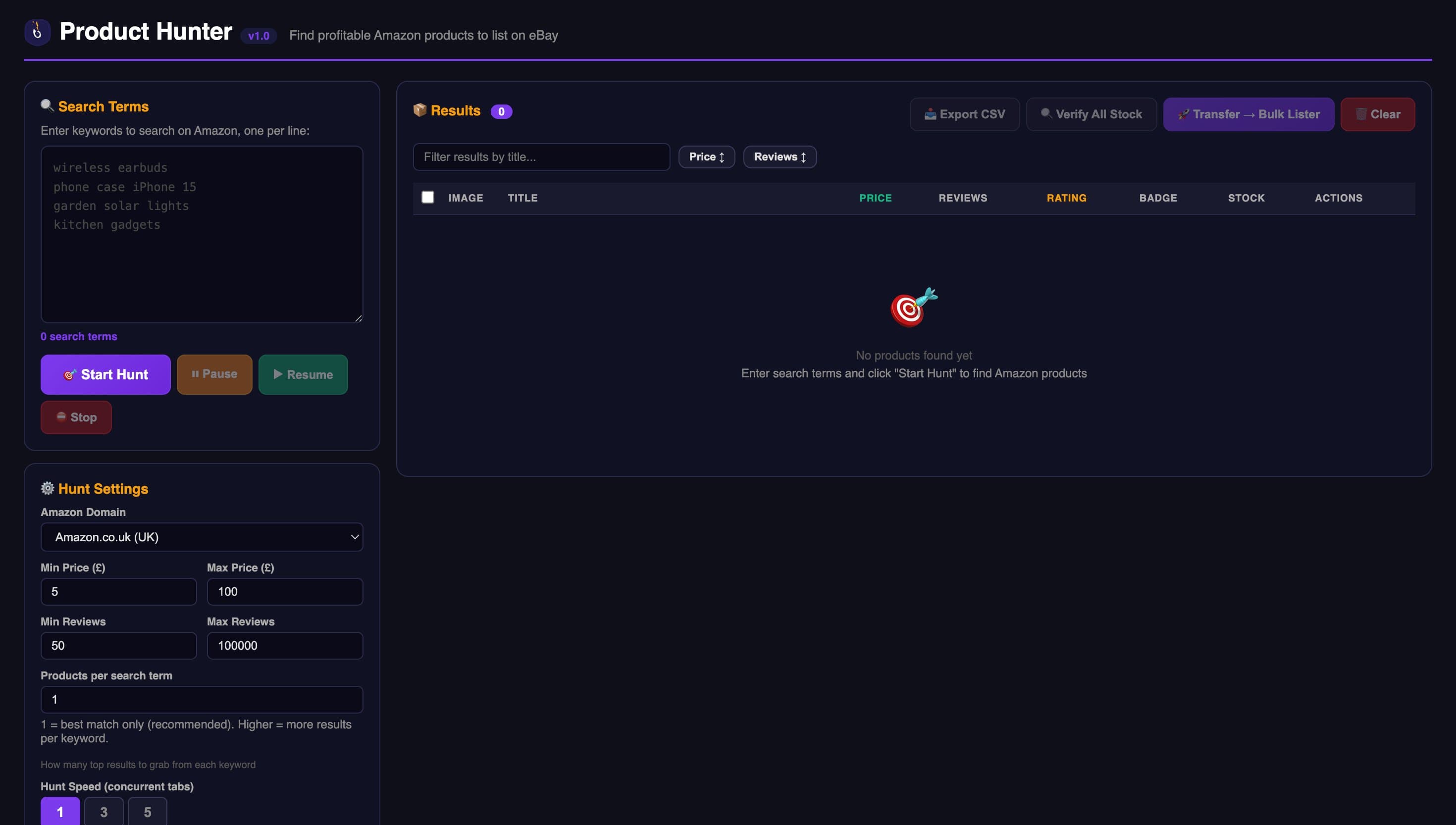
For keyword-based Amazon sourcing, UnicornDS Product Hunter complements competitor research by finding new winners outside any specific seller's catalog.
eBay Hot Product Finder is a free tool built into eBay Seller Hub. It shows you what is selling well on eBay right now, broken down by category, with basic sales indicators.
What sets it apart: Free. Data comes directly from eBay. Good starting point for beginners who want to see what is hot on eBay before they spend a penny on tools.
What it does not do: Pretty much everything serious researchers need. No seller URL scanning, no VERO filtering, no source data, no export, no listing integration. The products it surfaces are seen by every other eBay seller simultaneously, so niches saturate fast.
Pricing: Free.
Which Research Tool Fits Your Stage?
The right tool depends on your stage of the dropshipping journey.
Brand new, no budget: Start with eBay Hot Product Finder (free) plus Terapeak (free with eBay Store). These get you 2-3 weeks of learning before you need anything else.
First 3 months, ready to invest: UnicornDS 7-day £1 trial (free) then Starter (£29.99). You get Competitor Scanner, Product Hunter, AI titles, VERO, and listing in one tool. This is the fastest path from research to first sale.
Serious dropshipper scaling past 500 listings: Zik Analytics Enterprise ($44.99) for deep market analysis plus UnicornDS Growth (£59.99) for operational research and listing. The two together are what most experienced sellers use. Combined cost around $120/month for capabilities that would cost $300+ in siloed tools.
Already locked into AutoDS or EcomSniper: Use their built-in research. Avoid adding a third tool unless you have a specific gap. See our Chrome extension roundup for alternatives.
Need only CSV exports for a specific use case: eBextractor is the cheapest way to dump a competitor inventory. Not recommended as a primary workflow.
The Research Workflow That Actually Works
Having the right tool is only half the battle. The workflow matters more. Here is the system most successful sellers use.
Step 1: Find 5 target competitors. Go to eBay, search a keyword in your niche, click the sellers on page 1. Pick 5 whose feedback count is 1,000+ and whose business looks similar to yours. These are your study subjects.
Step 2: Scan their inventory. Use UnicornDS Competitor Scanner, Zik 500 Best Sellers, or EcomSniper to pull the full active listings from each of the 5 sellers. Export to one combined list.
Step 3: Filter for winners. Remove VERO products. Remove anything with fewer than 10 reviews on the source. Remove anything with margin under 15% after fees. You will go from 3,000 products to 200 winners.
Step 4: List them. Bulk list the 200 winners over the next 2 weeks. Use AI titles and VERO-safe keywords. The title optimization formula is here.
Step 5: Track what sells. After 30 days, look at which products sold. Go back to the competitors who sold those products and pull their newest listings. Repeat.
This workflow is how dropshippers go from 0 to 2,000 listings in 90 days. The research tool is the first step. The listing tool is the second step. UnicornDS is the only one that does both.
Common Mistakes in Competitor Research
Copying one seller entirely. If you copy one seller's full catalogue, you inherit their mistakes as well as their winners. Always pull from 5+ competitors and keep only products that appear on multiple sellers — those are the proven ones.
Ignoring VERO. Many top sellers take calculated VERO risks that would suspend a newer account. If you are under 3 months old, copy only non-VERO products. Account suspension is easy to avoid with the right filters.
Not checking source margins. A product that sells well on eBay for $25 is useless if it costs $22 on Amazon. Always calculate margin before listing. Use the eBay pricing formula.
Research paralysis. The most common mistake is spending 3 weeks researching and never listing anything. The goal of competitor research is to find 50 products this week, list them, and learn from what sells.
Frequently Asked Questions
What is the best free eBay competitor research tool?
eBay Hot Product Finder (built into Seller Hub) is the best free tool. Terapeak is also free for eBay Store subscribers. For free competitor URL scanning, no reliable free tool exists in 2026 — UnicornDS 7-day £1 trial is the closest you can get to free serious research.
Can I research eBay competitors without paying for a tool?
Partially. You can manually click into each competitor's eBay store, scroll their listings, and write down product ideas. This works for 10 products — after that, it is too slow. A tool lets you process thousands of products in minutes.
Is Zik Analytics better than Terapeak?
Different use cases. Zik has deeper historical data and a wider data set from scraping. Terapeak has official eBay data which is more accurate for sold prices. Most serious sellers use both — Zik for trend analysis, Terapeak for verifying specific products.
How does UnicornDS Competitor Scanner compare to Zik?
UnicornDS focuses on operational research — scan a seller, list their winners, move on. Zik focuses on market intelligence — analyse categories and trends deeply. They solve different problems and many experienced sellers use both.
Can I use competitor research to find products that are not on Amazon?
Yes. AliExpress-sourced products, hand-made items, and private label products all show up in competitor research. UnicornDS Competitor Scanner supports AliExpress as a source, not just Amazon.
Is it legal to copy products from other eBay sellers?
Copying product ideas and source links is fine and how dropshipping works. Copying a seller's actual photos, title text verbatim, or branding is not — that can lead to VERO complaints from the seller or from the brand. Always rewrite titles, use clean images, and avoid branded listings without authorisation.
How many competitors should I research?
5 to 10 sellers is enough. More than that creates too much data and slows decision-making. The goal is to find 100-200 proven products per week to list, not build a perfect database.
Does UnicornDS have a free version of Competitor Scanner?
The 7-day £1 trial includes Competitor Scanner with 5 seller scans per day, which is usually enough for 70-100 product ideas during the trial. After that, all paid plans include unlimited or high-limit scanning.
Scan any eBay competitor in seconds
UnicornDS Competitor Scanner pulls active listings from any eBay seller URL with VERO filtering and one-click listing. 7-day trial from £1, £1 charged today, cancel anytime.
Try 7 Days for £1 →